What matters most in this guide
- The 24-hour customer service window is an operational timing rule, not just a platform detail for support teams to memorize.
- Support leaders should design queues, reminders, and escalations around which conversations are likely to spill beyond the live service window.
- Service quality improves when teams plan explicit recovery paths for next-day follow-up, unresolved cases, and cross-team ownership.
- Wapitick-style visibility helps operators see timing risk before a conversation falls into a dead zone.
Why the 24-hour window changes support design
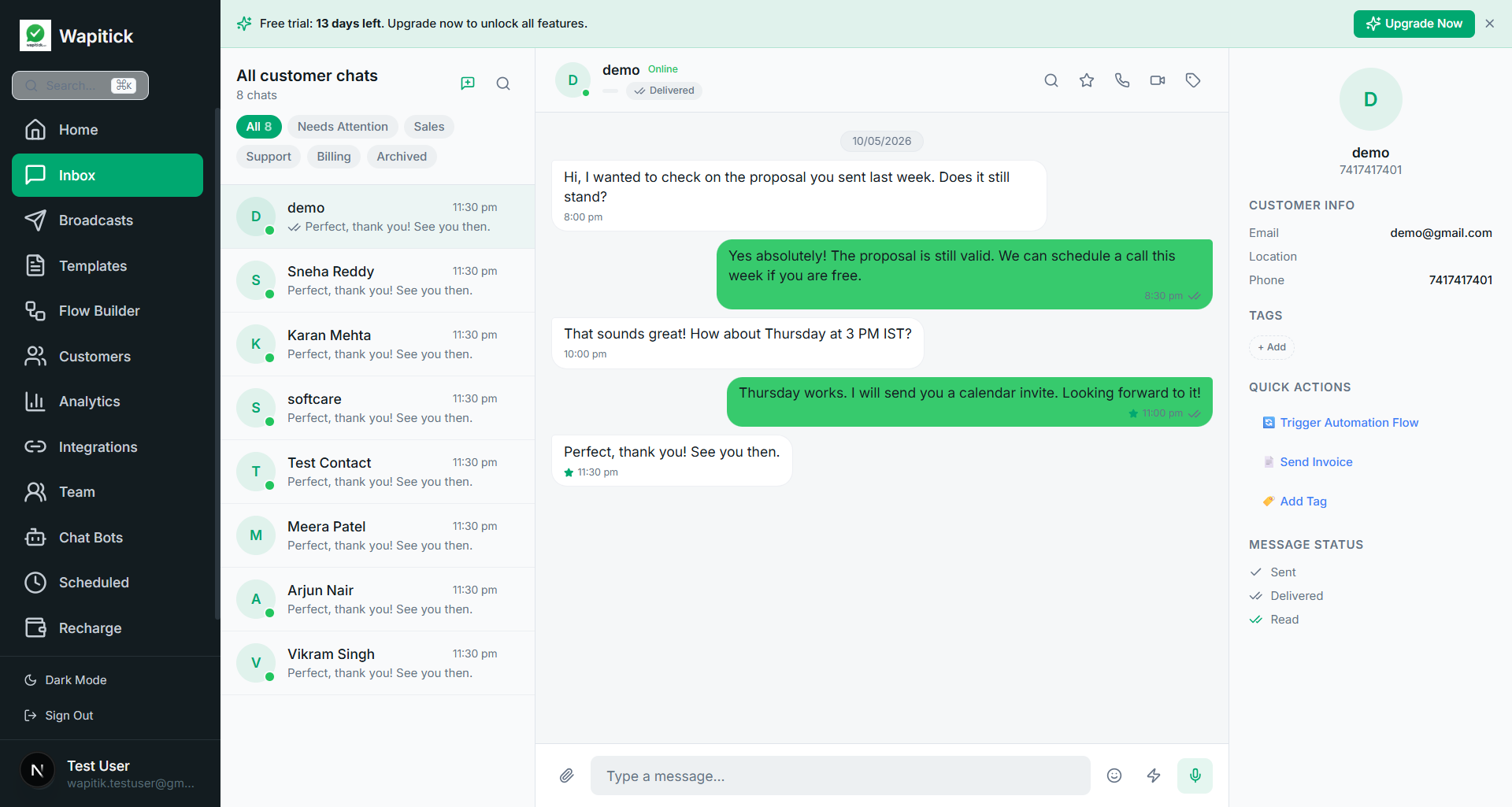
The 24-hour customer service window is one of the clearest examples of how a platform rule becomes an operational design constraint. It is easy to describe in technical terms, but its real effect is felt in staffing, routing, escalation, reminder strategy, and service recovery. Teams that understand the window build workflows that keep customer context moving even when timing changes. Teams that ignore it often discover the constraint only after a follow-up fails, an agent sends the wrong kind of response, or a customer experience breaks in a way that feels arbitrary to both sides.
Inside the service window, support can feel more conversational and natural. Agents can respond to clarifications, reassure a customer, ask follow-up questions, and work through an issue with less procedural friction. That flexibility is valuable because customer issues are rarely linear. Many support interactions depend on nuance, empathy, and the ability to adjust based on what the customer just said. The window protects that kind of back-and-forth and makes WhatsApp an effective support surface rather than a rigid notification channel.
The problem starts when teams assume that every support journey will conclude inside that window. In real operations, cases pause. Customers stop replying. Teams need to investigate internally. Another department needs to confirm a billing or logistics detail. A supervisor needs to approve a refund. The next action becomes due the following day rather than in the current exchange. This is where the service window becomes an operating issue, not just a messaging rule. The business must decide how to continue the journey responsibly and clearly once free-form messaging is no longer the default option.
Queue management SLAs and escalation planning
A mature support workflow begins by classifying which cases are likely to need cross-window follow-up. Delivery issues, billing disputes, service appointments, onboarding problems, compliance-related requests, and anything requiring investigation often fall into this category. Once the team knows which cases behave this way, it can prepare the right templates, reminders, ownership rules, and automation logic in advance. That preparation reduces the chance that an agent reaches for the wrong communication method simply because the case was not designed with timing in mind from the start.
The window also changes how queues should be managed. A shared inbox is not only a place to answer messages; it is a place to prioritize cases based on timing sensitivity. If a case is likely to benefit from another live touch before the window closes, the system should surface that urgency. If a case has moved outside the live-conversation stage, the next action should be explicit and compliant rather than improvised. Teams do better when the interface helps them understand not just who is waiting, but what kind of reply path is currently available. Timing awareness is a core support feature, not a reporting afterthought.
Support leaders should also think about the window when setting SLAs and escalations. A headline response target is not enough if the case requires multiple dependent actions and the channel's communication mode can change as time passes. The useful question is: what must happen before the window closes for the case to remain easy to resolve? In some cases that means getting a human acknowledgment out quickly. In others it means collecting the missing information that would otherwise require a template-based restart. The window should inform how teams define meaningful progress, not only first-response speed.
Reminder design exception handling and hybrid environments
Reminder design becomes more sophisticated once the service window is taken seriously. A next-day nudge, for example, is not simply a delayed response. It is a different kind of communication moment with different constraints and customer expectations. That means the content, timing, and call to action should be designed accordingly. A good support follow-up template usually references context, clarifies what is needed, and gives the customer a clear path back into progress. It should not feel like a random marketing message or a robotic status blast. Support communication still needs to feel respectful, even when it becomes more structured.
The same principle applies to exception handling. If a case cannot be resolved in one thread, the business should decide what the next best channel behavior is. Maybe the customer is sent a utility update. Maybe a Flow collects missing structured information. Maybe the case is escalated to another team while the customer receives a clear expectation about timing. What matters is that the behavior is intentional. Customers are usually more tolerant of delay than of ambiguity. When the business explains the next step and then follows through consistently, the service experience remains credible even when resolution spans multiple interactions.
Another subtle issue is internal visibility. In many organizations, one team answers the live message while another team owns the underlying resolution. If those teams do not share a view of timing, the case can drift. Someone assumes the other team will follow up. Another teammate believes the customer will message again. No one explicitly owns the template-based continuation path. A support operations platform should reduce that confusion by keeping ownership, notes, and next actions visible at the conversation layer. The customer should not pay the price for an internal handoff that lacks temporal awareness.
Hybrid environments make the situation even more complex. Some businesses still have a mix of app-driven and API-driven behavior. If the team does not understand how those surfaces interact with the customer service window, it can end up making false assumptions about what has been reopened or extended. This is where documentation and operator training matter a lot. Frontline staff should know when free-form reply is safe, when a template is required, and how the system signals that change. Even a good workflow can fail if the person executing it does not trust the rules or cannot see them clearly.
What to measure and what to explain to customers
For reporting, the window should influence how teams evaluate support performance. Looking only at overall reply counts can hide whether the team is resolving efficiently within the live conversation period or repeatedly deferring cases into more complex follow-up states. Useful metrics include how many cases are resolved inside the initial window, how many require template-based continuation, average time to next meaningful action, and the proportion of cases that go stale before follow-up happens. Those numbers reveal whether the support model is designed to work with platform realities or whether the team is constantly fighting them.
There is also a customer-experience benefit to being explicit. Many broken support journeys feel broken because the customer does not understand the rhythm of the interaction. They assume silence means neglect, while the internal team assumes silence means the case is paused. Businesses can reduce that mismatch by telling the customer what to expect. If an investigation will take a day, say so. If a next-step message will come later, say so. If action is needed from the customer to keep the case moving, say that too. Clear expectation-setting can preserve trust even when the operational constraints are real and unavoidable.
Treat the service window as part of a larger support choreography
The most resilient teams treat the service window as one part of a larger support choreography. Live replies, approved templates, Flows, contact notes, queue ownership, and internal escalation all work together. The goal is not to squeeze every issue into one uninterrupted chat. The goal is to design a support system that remains coherent as the conversation changes state. Once teams think this way, the window stops feeling like an arbitrary rule and starts functioning as a useful boundary for workflow design. Boundaries, when acknowledged properly, often improve discipline rather than reducing flexibility.
Platforms like Wapitick can help by translating timing constraints into visible operations. Instead of leaving teams to remember the rules manually, the system can make the next safe action obvious: reply now, send approved follow-up later, route to billing, collect structured details, reopen with the right template, or flag a pending case before the window closes. That is what operational maturity looks like in practice. It is not merely knowing the rule. It is designing the tooling and process so the rule becomes manageable under pressure.
In the end, support quality on WhatsApp depends on more than responsiveness. It depends on timing-aware coordination. When teams combine good queue design, clear ownership, respectful follow-up content, and measurable case-state transitions, the 24-hour window becomes something they can work with rather than something that surprises them. Customers experience continuity, agents experience clarity, and leaders see a support channel that is both human and operationally disciplined.